Loan Schemes
A loan scheme is a product definition: how much may be lent, for how long, at what rate and on what terms. Every loan is issued under a scheme.
Overview
Section titled “Overview”The scheme decides how interest is calculated, and that choice cannot be changed once loans exist under it. Interest method is the single most consequential field on this screen — get it wrong and every repayment schedule under the scheme is wrong.
Prerequisites
Section titled “Prerequisites”Before you begin
- You have the Create permission for Loan Scheme
- The classification groups you need already exist
Opening the screen
Section titled “Opening the screen”- Loans
- Masters
- Loan Scheme
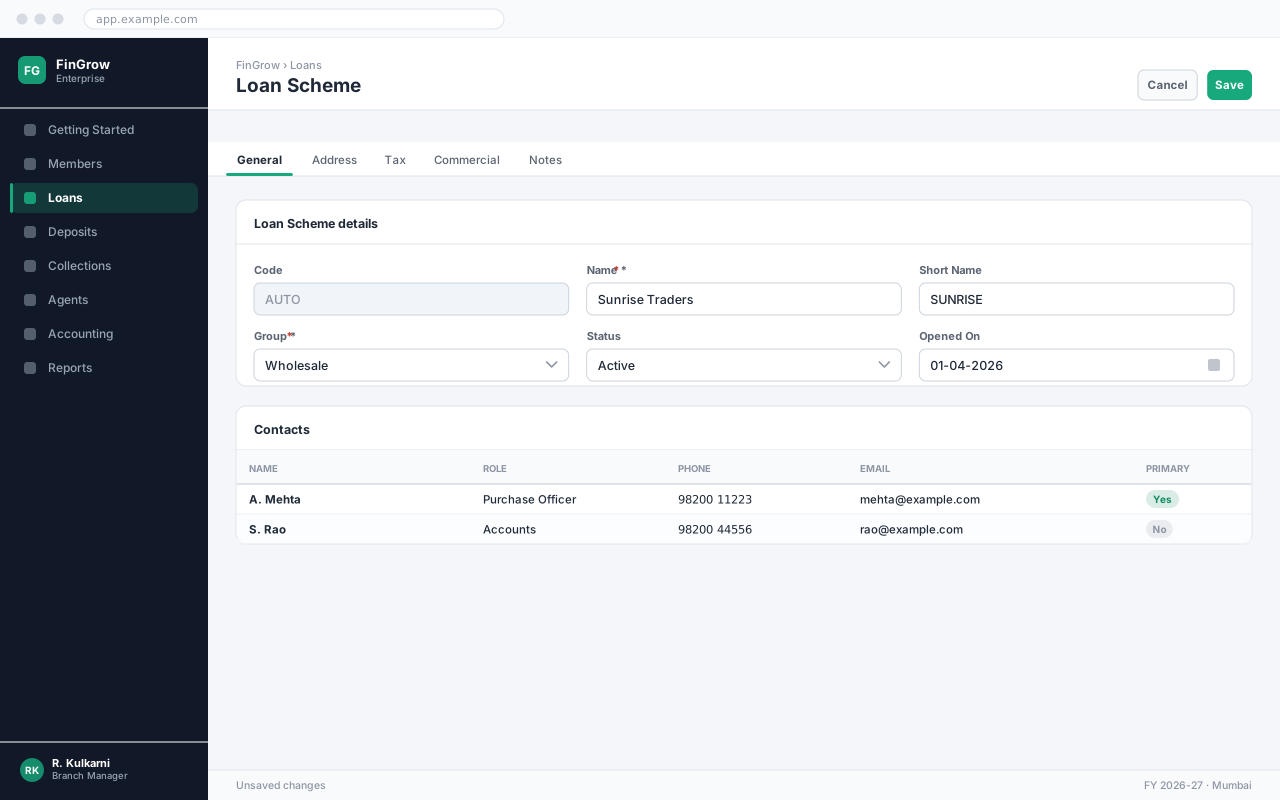
Creating a loan Scheme
Section titled “Creating a loan Scheme”Open the Loan Scheme list
The list shows every loan Scheme record you have access to, newest first. Use the search box to check whether the record already exists before creating a duplicate.
Start a new record
Click New. Loan Scheme opens with the code field already filled from the numbering series.
Complete the required fields
Fill every field marked with a red asterisk. The Save button stays disabled until all of them are valid.
Save the record
Click Save. The record becomes available to transactions immediately — there is no separate approval step.
Expected result
The record is saved, a code is allocated, and the loan Scheme immediately appears in transaction lookups.
Field reference
Section titled “Field reference”| Field | Type | Required | Default | Description | Notes |
|---|---|---|---|---|---|
| Scheme Code | Auto | Read-only | — | Allocated on save. | |
| Scheme Name | Text | Yes | — | Name shown to members and printed on documents. | |
| Interest Method | Dropdown | Yes | — | Flat, Reducing Balance or Daily Reducing. | Cannot be changed once a loan exists under the scheme. |
| Interest Rate | Percent | Yes | — | Annual rate. Used unless overridden at sanction. | |
| Minimum Amount | Amount | Yes | — | Smallest loan permitted under this scheme. | |
| Maximum Amount | Amount | Yes | — | Largest loan permitted without a special approval. | |
| Tenure (Months) | Number | Yes | — | Permitted repayment period, as a range. | |
| Repayment Frequency | Dropdown | Yes | Monthly | Daily, Weekly, Fortnightly or Monthly. | |
| Processing Fee | Percent | No | — | Deducted at disbursement. | |
| Penal Interest | Percent | No | — | Additional rate applied to overdue instalments. | |
| Guarantors Required | Number | No | 1 | How many guarantors an application must have. | |
| Collateral Required | Checkbox | No | Off | When on, collateral details are mandatory at sanction. | |
| Status | Dropdown | No | Active | Inactive schemes cannot take new applications; existing loans continue. |
Loan Scheme fields
Interest methods compared
Section titled “Interest methods compared”The method changes what the member actually pays. The figures below are for a 12-month loan of 100,000 at 12% per annum.
| Aspect | Flat | Reducing Balance | Daily Reducing |
|---|---|---|---|
| Interest charged on | Original principal, throughout | Outstanding principal at each instalment | Outstanding principal, day by day |
| Total interest | 12,000 | 6,619 | 6,598 |
| Instalment | 9,333 | 8,885 | Varies slightly |
| Early repayment benefit | None | Yes | Yes, immediate |
| Typical use | Small, short-tenure group loans | Standard term loans | Overdraft and cash-credit style |
Important notes
Section titled “Important notes”Common problems
Section titled “Common problems”The Save button is disabled
A required field is empty or invalid. Fields in error are outlined in red with the reason underneath — scroll up, the first error is usually in the header.
You do not have permission to perform this action
Your role is missing the relevant permission for this screen. Ask an administrator to check it against Roles & Permissions.
Frequently asked questions
Section titled “Frequently asked questions”Can I delete a loan Scheme record?
Not once it has been used on a transaction — deleting it would break the audit trail and every document that refers to it. Set Status to Inactive instead, which hides it from new transactions while keeping history intact.
Why does a loan Scheme not appear in the lookup?
Lookups list active records only. Open the record and check that Status is Active, and that its group is one your role is allowed to use.
Can two records share a name?
No. Names must be unique so that reports and lookups are unambiguous. Add a distinguishing suffix, such as a city or branch, if you genuinely have two similar records.