Member Registration
Member registration enrols a person into the society and opens their account. Everything else in FinGrow — loans, deposits, collections — hangs off a member record.
Overview
Section titled “Overview”A member record is created once and referenced from then on. Because transactions copy their defaults from it, a change here changes the behaviour of every future document — but never a document already posted.
Prerequisites
Section titled “Prerequisites”Before you begin
- The applicant has provided original identity and address documents
- The introducer, if your society requires one, is an existing member in good standing
- The membership fee has been collected, or will be collected on save
- You have the Create permission for Member
Opening the screen
Section titled “Opening the screen”- Members
- Registration
Creating a member
Section titled “Creating a member”Open Member Registration
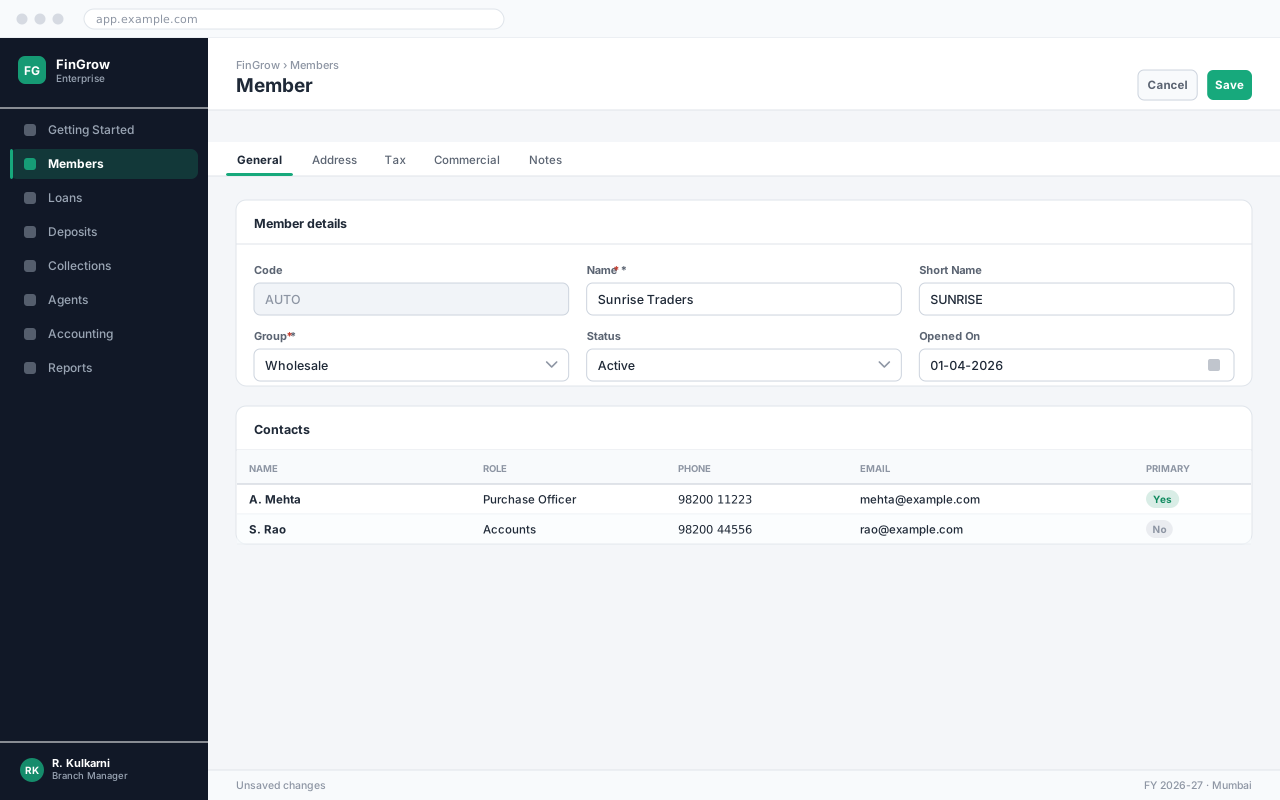
Go to Members → Registration and click New. The member number shows AUTO and is allocated on save.
Capture personal details
Enter the name exactly as it appears on the identity document. Mismatches between the member record and the KYC document are the most common reason an audit flags a file.
Record the KYC documents
Add one row per document with its type, number and expiry. Scan or photograph each one and attach it — an unattached KYC row counts as missing at audit.
Add the nominee
Enter the nominee name, relationship and share. Where there are several nominees, the shares must total 100%.
Assign the group and agent
Select the collection group and the field agent who will service this member. This determines whose collection sheet the member appears on.
Collect the membership fee and save
Enter the fee and the mode of payment, then click Save. The member number is allocated and a receipt is generated.
Expected result
The member is saved with a number such as MEM/0004821, appears on the assigned agent’s collection list, and is eligible to apply for loans and open deposit accounts.
Field reference
Section titled “Field reference”| Field | Type | Required | Default | Description | Notes |
|---|---|---|---|---|---|
| Member No. | Auto | Read-only | — | Allocated from the Member series on save. | |
| Name | Text | Yes | — | As printed on the identity document. | Must match the attached KYC exactly. |
| Date of Birth | Date | Yes | — | Drives age-based scheme eligibility. | Minimum age is set per society in Configuration. |
| Gender | Dropdown | Yes | — | Required for statutory reporting. | |
| Mobile | Phone | Yes | — | Used for collection reminders and OTP confirmation. | Must be unique across active members. |
| Address | Address | Yes | — | Residential address. Determines the collection route. | |
| KYC Documents | Grid | Yes | — | Document type, number, expiry and attachment. | At least one identity and one address proof. |
| Introducer | Lookup | No | — | Existing member introducing the applicant. | Mandatory if the society requires an introducer. |
| Nominee | Grid | Yes | — | Name, relationship and percentage share. | Shares must total 100%. |
| Collection Group | Dropdown | Yes | — | Group whose meeting the member attends. | |
| Agent | Dropdown | Yes | — | Field agent responsible for collections. | |
| Membership Fee | Amount | Yes | — | One-time fee. Posted to the membership fee income account. | |
| Status | Dropdown | No | Active | Active, Dormant or Closed. Only Active members may transact. |
Member fields
Important notes
Section titled “Important notes”Common problems
Section titled “Common problems”The Save button is disabled
A required field is empty or invalid. Fields in error are outlined in red with the reason underneath — scroll up, the first error is usually in the header.
You do not have permission to perform this action
Your role is missing the relevant permission for this screen. Ask an administrator to check it against Roles & Permissions.
Frequently asked questions
Section titled “Frequently asked questions”Can a member belong to two groups?
No. One member, one collection group, so that exactly one agent is accountable for the collection. Transfer the member if they move.
What if the member has no address proof?
Your society's configuration decides which document combinations are acceptable. Where a relaxed combination is allowed, the record is flagged for review and appears on the Incomplete KYC report.
How do I change a member's agent?
Open the member, change the Agent field, and save. The change takes effect from the next collection cycle; collections already generated stay with the old agent.
Can a dormant member apply for a loan?
No. Reactivate the membership first — dormancy usually means no transactions for twelve months, and reactivation is a counter formality.