Sales Invoice
The sales invoice bills the buyer for what was actually delivered, which is rarely exactly what was ordered.
Overview
Section titled “Overview”Fresh produce loses weight in transit and some of it is rejected on arrival. The invoice is therefore raised on delivered weight, adjusted for any shortage the delivery agent recorded, not on ordered weight.
Prerequisites
Section titled “Prerequisites”Before you begin
- The party exists and is active
- The items you need exist with a unit of measure
- The financial period you are posting into is open
Opening the screen
Section titled “Opening the screen”- Sales
- Transactions
- Sales Invoice

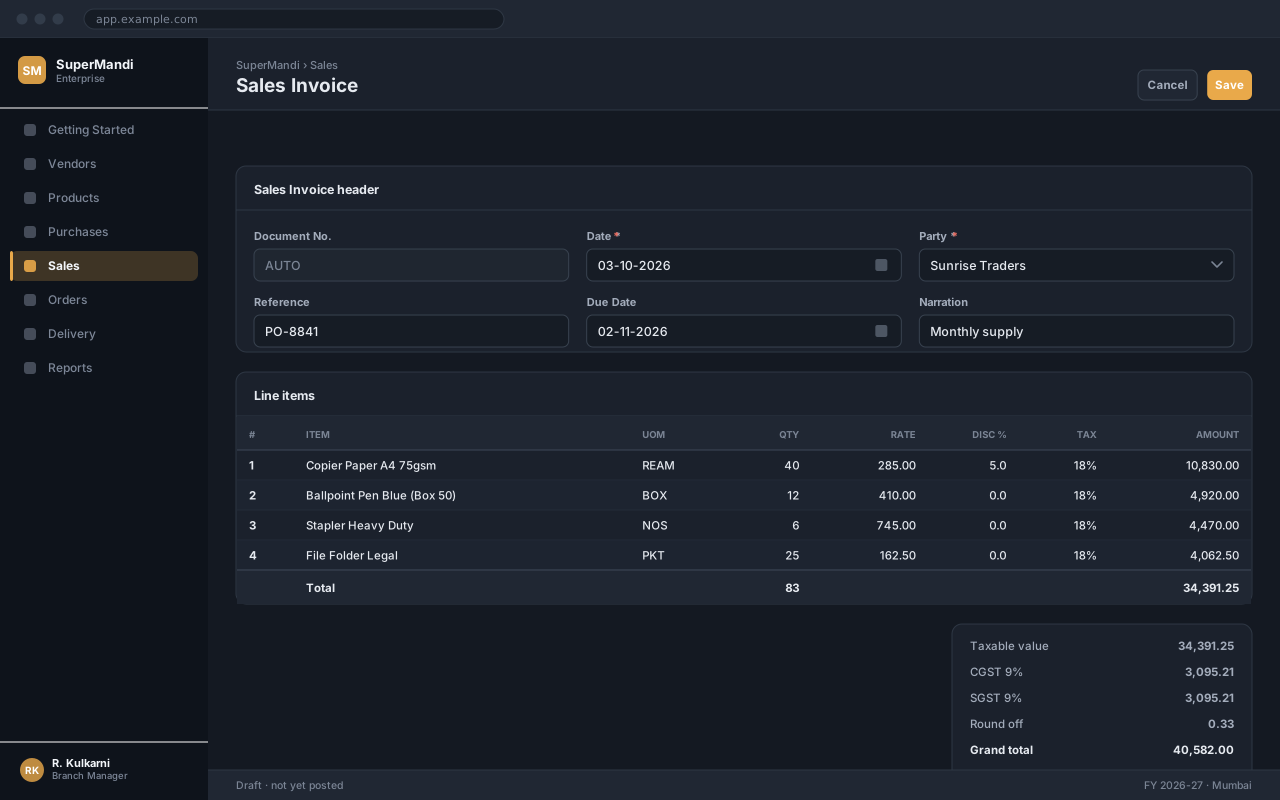
Procedure
Section titled “Procedure”Open Sales Invoice
Use the navigation path above, then click New to start a fresh document.
Enter the header
Set the date and select the party. The remaining header fields default from the party master and can be overridden.
Add the line items
Add one row per item. Rate and tax are proposed automatically; change them only if this document genuinely differs.
Check the totals
Compare the computed total against the source document before saving. The summary panel on the right breaks down taxable value, tax and the grand total.
Save and confirm
Click Save to record the document, then Confirm to post it. A saved-but-unconfirmed document has no accounting effect.
Expected result
The document is saved with a number from its series and a status of Confirmed, and appears in the sales Invoice list and the relevant reports.
Field reference
Section titled “Field reference”| Field | Type | Required | Default | Description | Notes |
|---|---|---|---|---|---|
| Document No. | Auto | Read-only | — | Number allocated from the Sales Invoice series when the record is saved. | Gaps are not permitted; cancel rather than delete. |
| Date | Date | Yes | Today | Effective date of the transaction. | Must fall inside an open financial period. |
| Party | Dropdown | Yes | — | The account this transaction is raised against. | Only active parties are listed. |
| Reference | Text | No | — | The other party's document number, for reconciliation. | |
| Narration | Text area | No | — | Explanation carried through to the ledger and the printed document. |
Sales Invoice fields
Important notes
Section titled “Important notes”Common problems
Section titled “Common problems”The Save button is disabled
A required field is empty or invalid. Fields in error are outlined in red with the reason underneath — scroll up, the first error is usually in the header.
You do not have permission to perform this action
Your role is missing the relevant permission for this screen. Ask an administrator to check it against Roles & Permissions.
The period is closed
The date falls in a financial period that has been closed. Either use a date in an open period, or ask an administrator to reopen it — which affects everyone, so it is rarely the right answer.
The rate comes in as zero
No price is configured for that combination of party and item on this date. Check the applicable price list, and whether its validity window covers the document date.
Frequently asked questions
Section titled “Frequently asked questions”Can I edit a sales Invoice after saving?
While it is still in Draft, yes — every field is editable. After confirmation only non-financial fields such as Narration can be changed; anything else requires cancelling and re-raising the document.
Why is the document number not sequential?
Numbers are allocated when a document is saved, so a cancelled document leaves its number used. That is intentional: a gap-free series is what makes the audit trail defensible.
Can I change the date after confirming?
No. The date determines which period the entry posts into, so changing it would move an already-posted entry between periods. Cancel and re-raise with the correct date.